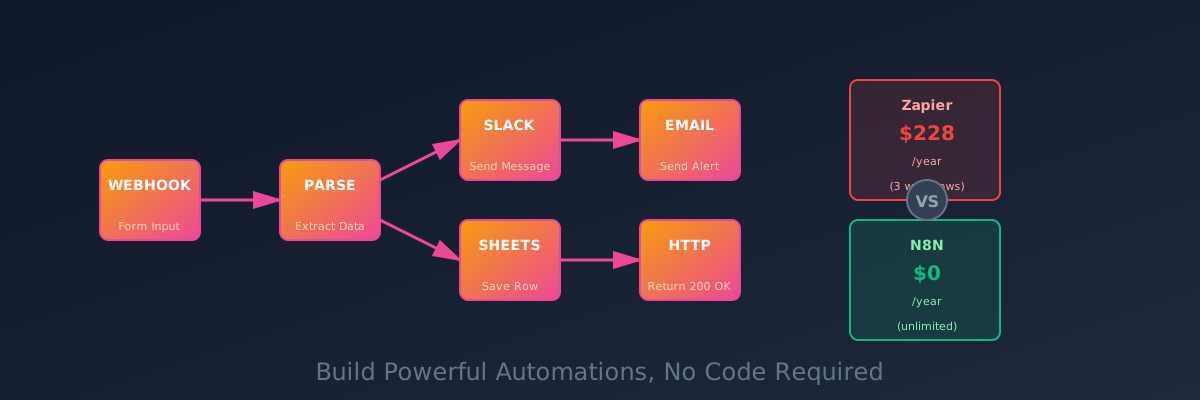
Automate Everything With N8N: No-Code Workflows Without Zapier's Price Tag
Self-host N8N and build powerful automations. Connect anything to anything. No coding required. Replace Zapier for a fraction of the cost.
I was paying $19/month for Zapier to do three things:
- Send me a Slack message when someone filled out my contact form
- Add rows to a Google Sheet from a webhook
- Tweet a reminder every Monday
Nineteen dollars a month. That’s $228 a year. For three automations. I felt stupid.
Then I discovered N8N. “What if I just… hosted this myself?” And suddenly that $228 turned into “one server with 500 automations running simultaneously.”
Why Self-Hosted Automation Matters
Zapier works. Make.com works. They’re platforms that connect services together. Pay monthly, click buttons, watch magic happen.
But here’s what bothers me about them:
- Cost scales stupidly. Each “task” costs money. Run it 10,000 times a month? Better open your wallet.
- You’re locked in. Export your automation? Good luck. They want you dependent on their platform.
- Rate limiting and throttling. Free tier gets crushed. Paid tier costs real money.
- Data goes through their servers. For some workflows, that’s a problem.
N8N solves all of this. Self-hosted automation platform. Open source. Free. Run as many workflows as you want. No limits except what your hardware can handle.
I’m not exaggerating when I say this changed my life. I went from paying for basic automation to building intricate workflows that would have been cost-prohibitive on Zapier.
Deploy N8N
This is straightforward. One container, some persistent storage, and you’re cooking.
version: '3.8'

services:
  n8n:
    image: n8nio/n8n:latest
    container_name: n8n
    restart: unless-stopped
    ports:
      - "5678:5678"
    volumes:
      - ./data:/home/node/.n8n
    environment:
      - N8N_HOST=n8n.yourdomain.com
      - N8N_PROTOCOL=https
      - WEBHOOK_TUNNEL_URL=https://n8n.yourdomain.com/
      - DB_TYPE=sqlite
      - GENERIC_TIMEZONE=Europe/Paris
With Traefik reverse proxy:
version: '3.8'

services:
  n8n:
    image: n8nio/n8n:latest
    container_name: n8n
    restart: unless-stopped
    volumes:
      - ./data:/home/node/.n8n
    environment:
      - N8N_HOST=n8n.yourdomain.com
      - N8N_PROTOCOL=https
      - WEBHOOK_TUNNEL_URL=https://n8n.yourdomain.com/
      - DB_TYPE=sqlite
      - GENERIC_TIMEZONE=Europe/Paris
    labels:
      - "traefik.enable=true"
      - "traefik.http.routers.n8n.rule=Host(`n8n.yourdomain.com`)"
      - "traefik.http.routers.n8n.entrypoints=websecure"
      - "traefik.http.routers.n8n.tls.certresolver=letsencrypt"
      - "traefik.http.services.n8n.loadbalancer.server.port=5678"
Start it:
docker compose up -dOpen your browser and create an account. You’re in.
The Core Concept: Workflows
N8N works in workflows. A workflow is a series of nodes connected together. Each node does one thing:
- Trigger: Something happens (webhook, schedule, email received)
- Action: Do something (send email, update database, POST to API)
- Logic: Conditional branching (if X, then Y)
- Transformation: Reshape data
You build these by dragging and dropping. No coding required (though you can code if you want).
Your First Automation: A Real Example
Let’s build something useful: “Notify me on Slack when someone submits a form, and save their data to a Google Sheet.”
Step 1: Create a Webhook Trigger
In N8N, click the + button and search for “Webhook.” Add it as your first node.
Configure it:
- Method: POST
- Path:
/contact-form
N8N generates a webhook URL for you. You’ll use this in your form.
Step 2: Add a Slack Node
Click + and search for “Slack.” Connect it to the webhook.
Configure:
- Choose your Slack workspace and auth
- Set the channel:
#notifications - Set the message:
"New submission: {{ $json.name }} ({{ $json.email }})"
Those {{ }} things? That’s accessing data from the webhook payload.
Step 3: Add a Google Sheets Node
Click + and search for “Google Sheets.” Connect it to the webhook.
Configure:
- Authenticate with your Google account
- Pick your spreadsheet
- Map columns: Name → A, Email → B, Message → C
Step 4: Test It
Click the “Test” button. Send a fake POST request:
curl -X POST https://n8n.yourdomain.com/webhook/contact-form \
  -H "Content-Type: application/json" \
  -d '{"name":"John","email":"[email protected]","message":"Hello!"}'
Your Slack gets a message. Your Google Sheet gets a new row. Done.
Step 5: Activate It
When you’re happy, click Activate. Your workflow is now live. Every POST to that webhook triggers it.
That’s a full automation in 10 minutes. On Zapier, this would cost $19/month and require 2-3 tasks.
Real Automations I’m Running
Let me share what I actually use N8N for:
1. Daily Digest Emails
Trigger: Every morning at 8 AM Actions:
- Query my database for unread messages
- Fetch the weather
- Check my calendar
- Compile everything into a nice HTML email
- Send to my inbox
Turns what would be 5 separate Zapier “tasks” into 1 N8N workflow. Cost: $0. Frequency: Daily.
2. Discord Notifications for Website Errors
Trigger: My error logging service posts to a webhook Actions:
- Parse the error data
- Check if it’s a repeat (query database)
- If new, post to Discord with the stack trace
- If repeat, update existing message
This would require custom coding on Zapier. N8N handles it visually.
3. Backup Rotation
Trigger: Every Sunday at 2 AM Actions:
- SSH into my server
- Trigger a backup script
- Upload the backup to S3
- Delete backups older than 30 days
- Email me a confirmation
N8N has SSH nodes. You can literally orchestrate your infrastructure with this.
4. Social Media Scheduling
Trigger: Database query—posts marked “ready to publish” Actions:
- Format the post for Twitter, Mastodon, LinkedIn
- Post to each platform (using their APIs)
- Update database status to “published”
One workflow, three platforms, one command. Beautiful.
The Connectors: What You Can Connect
N8N has 300+ connectors out of the box:
- Cloud: AWS, Google Cloud, Azure, Slack, Discord
- Data: Databases (PostgreSQL, MySQL, MongoDB), APIs, Webhooks
- Services: Google Sheets, Airtable, Notion, Email, SSH
- Custom: HTTP requests, regex, JavaScript code nodes
Basically: if it has an API, N8N can probably talk to it.
For something more esoteric? Use the HTTP node to make a raw request to any API. Instant support for anything.
Scheduling: Run on a Schedule
Most of my workflows run on a schedule. The Cron node handles this.
0 8 * * * — Run at 8 AM every day
0 0 * * 0 — Run at midnight every Sunday
*/15 * * * * — Run every 15 minutes
Cron syntax is standard Unix. Tons of online generators if you’re rusty.
Error Handling (Important)
Workflows fail. Webhooks time out. APIs go down. You need error handling.
Add an Error Handling node after critical nodes:
Node → If error → Send error email → StopOr retry:
Node → If error → Wait 5 seconds → Retry NodeThe difference between a workflow that “sometimes works” and one that’s reliable is error handling.
Conditional Logic: If/Then Branches
Not every workflow is linear. Use the If node for conditional branching.
Example:
Webhook input → If field "status" == "urgent" →
  → Yes: Send to high-priority queue
  → No: Send to normal queue
This is where automation gets powerful. You’re not just pushing data around; you’re making decisions.
Performance & Scaling
N8N on a single container can handle A LOT. I’m running 50+ workflows simultaneously on a 1GB RAM instance. Some more complex than others.
If you hit limits:
- Enable PostgreSQL instead of SQLite (better for concurrent workflows)
- Run multiple workers (one instance processes triggers, others process jobs)
- Scale the container (if hosted on a powerful machine)
For most homelabs, the default setup is fine.
Maintenance & Backups
N8N stores everything in the /home/node/.n8n directory. Backup this regularly:
# Weekly backup
docker exec n8n tar czf - /home/node/.n8n > n8n-backup-$(date +%Y%m%d).tar.gz

# Or use your standard backup solution
If N8N crashes, your workflows are still there. Data is safe.
The Learning Curve
There’s a learning curve. Building your first workflow is intuitive. Building your 20th? You’ll encounter edge cases.
But here’s the thing: N8N community is excellent. Workflow examples, tutorials, and a Discord server full of people who’ve solved your problem already.
The Cost-Benefit Reality
If you’re using Zapier:
- Paid plan: $25-99/month
- Usage overages: $0.99-5 per extra 1000 tasks
- Scale to 100,000 tasks/month: You’re spending $200+
With N8N:
- Setup time: 15 minutes
- Cost: $0
- Monthly maintenance: 5 minutes
- Scaling to 100,000 tasks/month: Still $0
The break-even point is around month 1. After that, it’s pure savings.
One Caveat
N8N is self-hosted. You’re responsible for:
- Keeping it running
- Backing it up
- Monitoring it
- Updating it
If you don’t have a habit of maintaining your homelab, Zapier’s “just works” might be worth the cost.
But if you’re already maintaining other services? Adding N8N is trivial. And the ROI is immediate.
Running N8N since January 2024. Replaced 12 different Zapier automations. Estimated savings: $2,500/year. Also gained the ability to build automations that would’ve been impossible on Zapier. Would absolutely do it again.
Stay in the loop 📬
Get self-hosting tutorials, tool reviews, and infrastructure tips delivered to your inbox. No spam, unsubscribe anytime.
Join 0 self-hosters. Free forever.